
A one-time campaign sends once to the people you pick. A Behavly Agent keeps running: people enter the moment they qualify, and each one is taken along a path you draw — emails, waits, and branches on what that person did.
Starting One
- 1Open Campaigns → New Campaign and give it a name.
- 2Choose Behavly-Agent campaign, then Continue. The Agent builder opens with the name carried across.
- 3Pick Start from scratch, or Use an example to open a ready-made path (Onboarding, Win back quiet users, Feature adoption or Trial ending) and change what you like.
- 4From scratch, Describe the path opens first: say what you want in words and choose Build the path, or choose Choose a pattern to pick who enters and add the steps yourself.
Under those two, Suggested for your users always shows three ready paths. They come first from the largest patterns Behavly found in your tracking, such as people who went quiet, got stuck, or never did a key action; each of those cards says how many people match today and what the path does. When fewer than three patterns have enough people, example paths (marked Example) fill the row. Opening a pattern’s card puts that pattern in as who enters, with the emails, waits and branch already laid out; for a “never did X” pattern it also sets X as the goal. Everything stays editable and nothing sends until you activate.
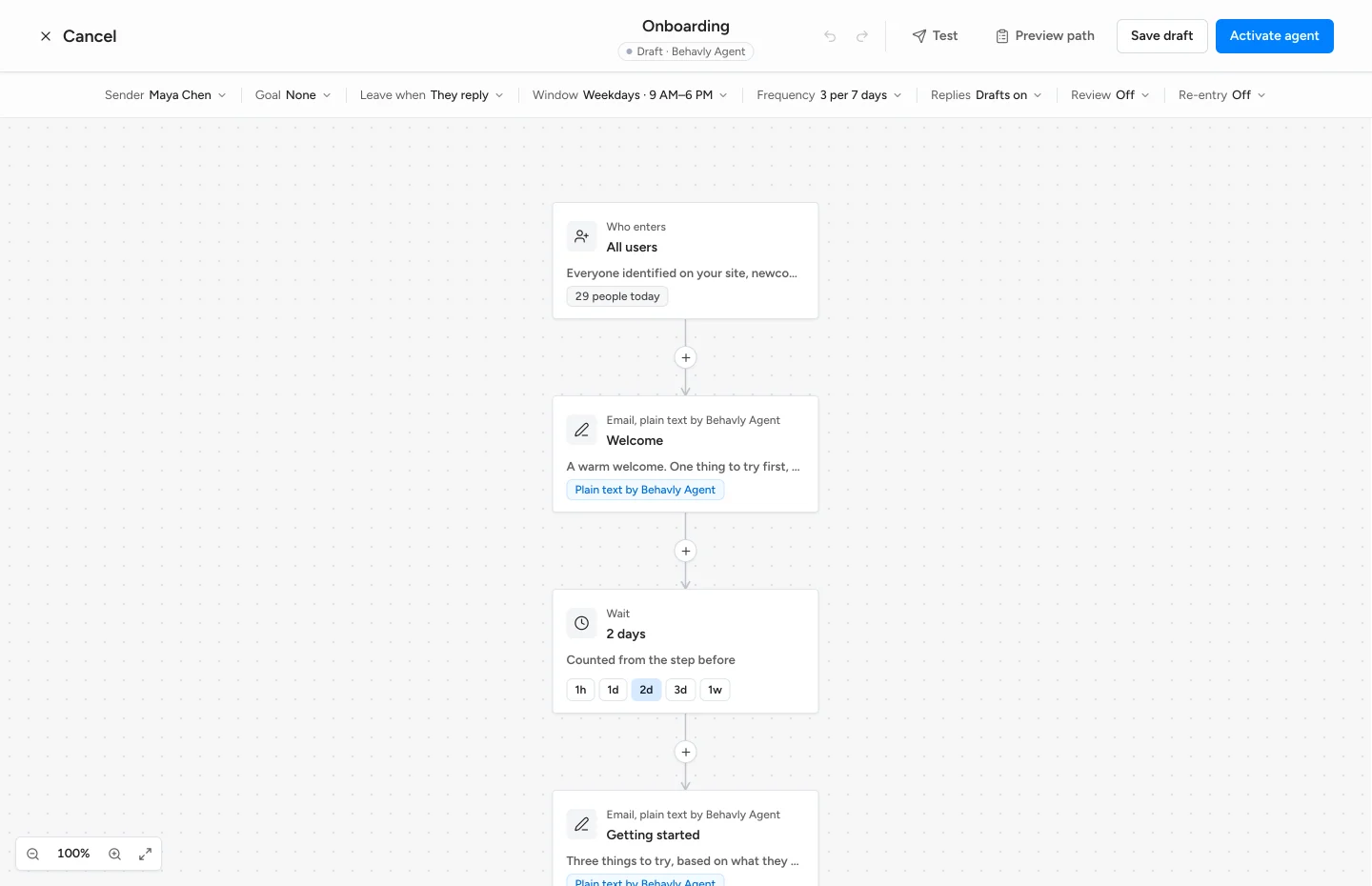
Across the top, a bar holds the settings for the whole path, each with its current value: Sender, Goal, Leave when, Sending window, Frequency, Replies, Review & language and Re-entry. Choose one to change it. The path fills the rest of the screen; selecting a step opens its settings on the right. Every connection has a + for adding a step.
Agents are on Starter and above. On Free the card shows Locked and choosing it opens the upgrade dialog. See What Counts Against A Limit.
Who Enters The Path
- All users
- Everyone identified on your site, newcomers as they arrive.
- A pattern
- A group Behavly detected or one you saved. Under Looking for another pattern? you can describe a new one in words and Add this pattern; it is saved and used like any other.
- Form leads
- People who left their email in a form or were added to your leads and never signed in. Their emails introduce your product, and for a business lead also draw on their company's website.
- Specific people
- Picked one by one, pasted, or imported from a CSV. Everyone you picked enters.
Behavly re-checks who is in the group every 10 minutes. Each person enters a given agent once, the moment they qualify.
- Enroll people who already match
- Off by default, which means only newcomers enter. Turn it on to bring in the people who are in the group when you activate.
- Allow re-entry after 90 days
- Off by default. Lets someone go through the path again 90 days after they finished it. Never after a reply or an unsubscribe.
Someone who stops matching the group is not taken off the path. Use the exits below for anything that should end it.
The Steps
- Email template
- One of your published templates. Send as designed sends it exactly as you built it, to everyone. Edited by Behavly keeps your design and edits the wording for each person from what they did.
- Plain text by Behavly Agent
- Behavly writes the email for each person, in your sender's voice, from their activity. Instructions for Behavly Agent is where you say what the email is for.
- Wait for a set time
- Hours or days after the previous step.
- Wait until a day and time
- The next matching weekday, at that hour, in each person's own timezone.
- Wait until they do something
- Continues as soon as they act, or after the limit you set (But no longer than N days).
- Branch
- Splits the path on whether they opened the previous email, clicked a link in it, logged in to your site, visited a page, replied or did an action in your product — within the number of days you set. Yes goes one way; no goes the other once the days run out.
- Stop the path
- Ends the path for that person.
Did an action in your product uses the events your product sends with behavly.track (for example project_created). Pick one from the list, which shows how many people did each, or type the name of one you are about to start sending. Wait until they do something can wait for an action the same way.
Skip if they already did it (under Rules for this email) leaves an email out for anyone who already did the action or visited the page it is about, at any time before it would send. Someone who already invited their team never gets the “invite your team” email.
For visited a page, choose how the page matches: Is exactly (that page, with or without a trailing slash), Starts with (the page and every page under it) or Contains (any address with that text, like a translated /de/pricing).
Signals from your site are picked up as soon as they happen; replies within 10 minutes. Only what a person did counts: Apple Mail loading the images by itself is not an open, a mail security scanner following the links is not a click, and a click on the unsubscribe link never counts. An out-of-office reply is not a reply either; when it says when they are back, the path holds their emails until that date.
Every email Behavly writes or edits counts toward the AI emails on your plan. Templates sent as designed do not.
Reply in the same thread (under Rules for this email) sends an email as a reply to the one before it: the subject becomes “Re:” and the first email’s subject, and the person’s inbox shows it under the earlier email, like a follow-up from a colleague. It is on by default for emails Behavly writes after the first, off for templates. The first email always starts the thread.
Describe The Path
When you start from scratch, Describe the path asks first. Say who it is for and what each email should do, in your own words, and choose Build the path. Behavly lays out who enters, the emails, waits and branches for you to check, and Undo brings the empty path back. Nothing sends until you activate.
See The Emails Before They Send
- Preview on any email step: pick a real person from the audience and Behavly writes the step for them exactly as it would when it sends, shown in a full-size email view. Nothing is sent. Switch the person or choose Write again to see another version.
- Test in the top bar (Send the path to me): every email on the path, written for one real person, arrives in your own inbox at once, marked [Test], with follow-ups replying in their thread. Waits are skipped, and only you receive anything. One path sends just one route instead: pick the side of each branch, and the version of each A/B test.
- Each written preview or test email counts toward the AI emails on your plan. Templates sent as designed cost nothing.
A/B Test A Step
On any email step, A/B test lets you try a second version on half the people who reach it. For an email Behavly writes, version B is a second set of instructions; for a template step, a second template. Each person always gets the same version.
Once the step has sent, the card shows each version’s results and where the test stands, judged on the path’s goal when it has one (otherwise on clicks). Behavly names a winner only when each version has at least 30 sends and the gap is unlikely to be chance; before that it says it is too early to call. Keep A or Keep B ends the test; publish the change to use it. Preview can show either version, and Send the path to me sends both.
The Goal
Under Goal in the settings bar, say what success looks like for the path: an action in your product (an event sent with behavly.track, such as upgraded) or a visit to a page (Is exactly, Starts with or Contains).
Behavly then counts who reaches it, and credits each person to the last email they got before they did. It counts while they are on the path and for 7 days after their last email, so someone who upgrades two days after the path ended still counts. Without a goal, the path still runs; it just can’t show which emails work.
Replies
Behavly reads every reply to a campaign email and files it in the Unibox under the status it fits: High-intent when they are interested, Follow up for a question, Referral when they point you to someone else, Suppress for a no or an unsubscribe, and Replied for anything else. A status you set yourself is never replaced.
On an Agent, Draft a reply when they’re interested or ask something (under Replies in the settings bar, on by default) also writes a suggested answer that waits in the Unibox for you to check and send. Each one uses one of your plan’s AI reply drafts. The bell names these replies (“Maya is interested”), and the person’s timeline on the Agent shows what their reply said.
When People Leave
Under Leave when in the settings bar. These end the path immediately, whatever step the person is on:
- They reply
- On by default. A reply to any email on the path ends it. Out-of-office replies don’t count.
- They reach the goal
- Off by default. Reaching the goal is counted either way; this decides whether it also ends the path.
- They unsubscribe or bounce
- Always on.
Settings For The Whole Path
In the bar above the path. On a narrower screen the items that don't fit are under More. A red dot marks a setting that needs fixing before you can activate.
- Sender
- Personal, Team or Company — the same three voices as a one-time campaign.
- Sending window
- The days and hours emails may go out. Monday to Friday, 9:00 AM to 6:00 PM by default, in each person's timezone (UTC when it is unknown). A wait that ends outside the window holds the next email until it opens.
- At each person’s usual hour
- Off by default. When on, an email waits for the hour that person is most often on your site, counted from their own visits in the last 90 days and kept inside the sending window. It applies to someone who has visited at least four times on at least three different days; anyone else gets the email as soon as the window is open. It is a count of when they were there, not a prediction, and it can hold an email for up to a day (longer over days the window is closed).
- Frequency
- Never more than N emails per person every N days — 3 every 7 by default. Counts only the emails this agent sends.
- Rotate all active mailboxes
- On by default. Each person keeps the same mailbox for the whole path.
- Default language
- Detected for each person (English when it cannot be told), or English for everyone. Each written email can also be set to one language.
- Hold Behavly-written emails for approval
- Holds every email Behavly writes or edits in Review until you release it. Templates sent as designed always go on time.
Approval is off by default on an Agent, unlike a one-time campaign. With it off, written emails send as soon as they are ready. Turn it on until you have read enough of what an agent writes to trust it.